FILE / 2026Production handoff manual

Rhinestone transfer artwork file guide.

A useful artwork package answers three questions at once: what should the design look like, how large and where should it sit, and what product and order conditions must the finished transfer support?

Follow the Six Steps
Finished-output referenceTB-F5FA8EDBA220
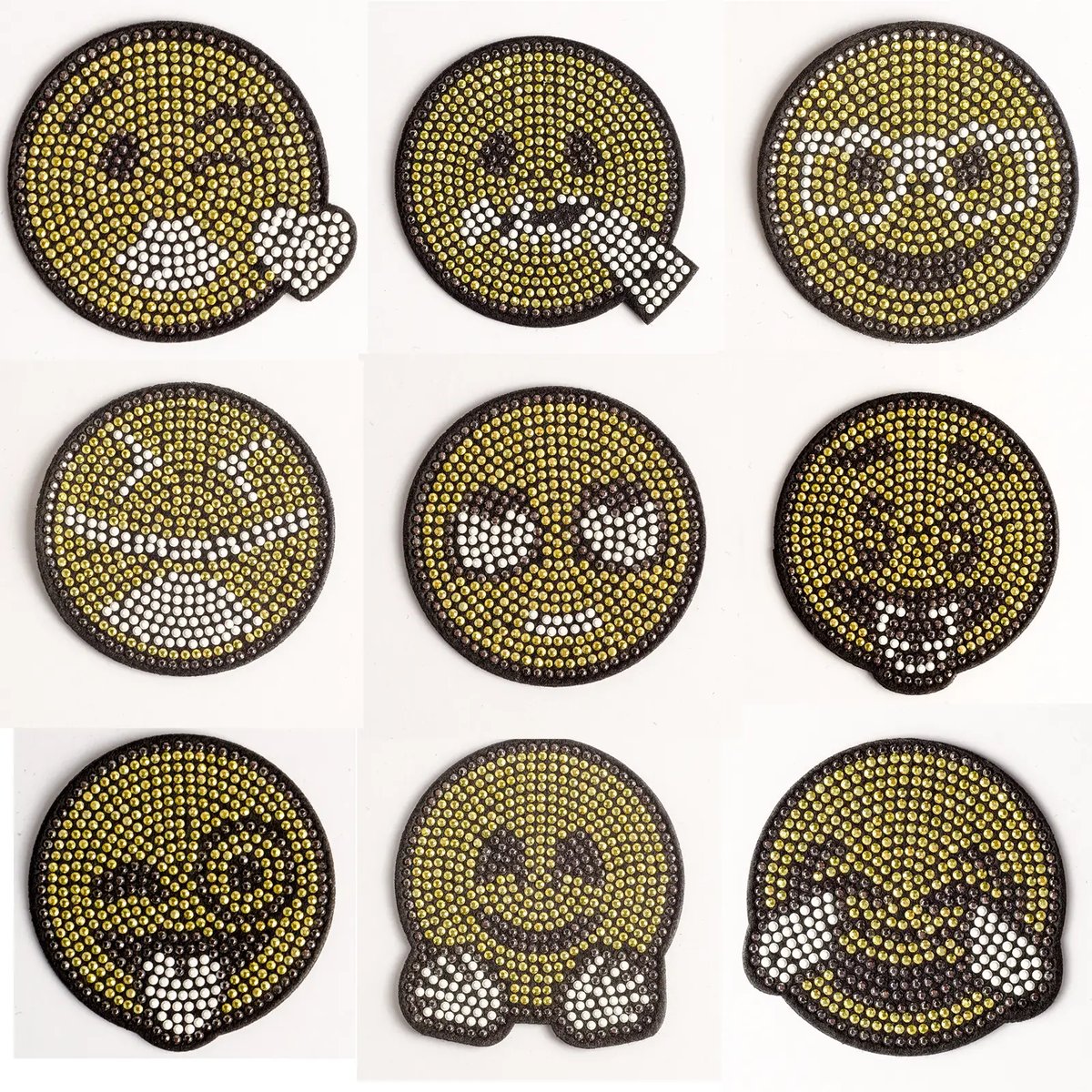
Smile face rhinestone hotfix motif with felt fabric, catalog code TB-F5FA8EDBA220
Recorded reference: rhinestone and felt fabric, 6.3 × 6.3 cm, MOQ 100. It illustrates a finished catalog motif; it does not set universal artwork or order terms.
Preferred source
AI / EPS / SVG / vector PDF
Raster fallback
Highest-resolution original
Upload limit
One optional file, up to 70 MB
Always include
Dimensions, garment, quantity, destination
  1. 01
    Step

    Identify the authorized artwork

    Choose the approved logo or graphic revision, confirm that you are authorized to use it, and separate reference imagery from the actual production artwork.

  2. 02
    Step

    Supply the cleanest source file

    Send editable AI, EPS, SVG, or vector PDF artwork when available. If only raster artwork exists, provide the highest-resolution original rather than a screenshot or compressed copy.

  3. 03
    Step

    State finished dimensions and placement

    Give the required width and height, units, orientation, receiving product, measured garment position, and any placement tolerance the team must review.

  4. 04
    Step

    Describe the intended visual result

    Identify required colors, important small details, areas that may be simplified, preferred material references, and whether the design should use a single or mixed visual treatment.

  5. 05
    Step

    Add production and application context

    Describe the receiving fabric, stretch, surface, color, coating, application equipment, sample need, inspection requirement, and any care or durability evaluation requested.

  6. 06
    Step

    Submit the commercial scope

    Include sample and bulk quantities, destination, target date, packing and labeling needs, and the contact who can approve artwork, sample, and written order terms.

File clinic

Ready to review or needs clarification?

A reviewer should be able to identify the intended artwork revision and measure the requested result. Use this quick screen before the file reaches the quote form.

Ready for first review
  • YESAuthorized artwork and revision are named
  • YESVector paths or highest-resolution original are supplied
  • YESWidth, height, units, orientation, and placement are stated
  • YESRequired colors and protected details are identified
  • YESReceiving fabric and application context are described
  • YESQuantity, destination, date, and packing scope are included
Likely clarification needed
  • ASKScreenshot is the only source and fine detail is unclear
  • ASKMultiple logo versions are supplied without naming the approved one
  • ASKDimensions are described only as small, medium, or large
  • ASKFonts, linked images, or color references are missing
  • ASKGarment and placement are shown without measurements
  • ASKNo quantity, destination, or approval contact is included
Format desk

What each file contributes.

Artwork file formats accepted for LCHOTFIX quote review
FormatBest contributionReview note
AI / EPS / SVGEditable paths and scalable geometryPackage linked elements and identify the approved revision.
Vector PDFPortable dimensioned vector referenceConfirm it contains vector artwork rather than only a placed bitmap.
PSDLayered raster source and visual effectsRetain useful layers and include intended finished dimensions.
PNG / WEBPTransparent or clean visual referenceSupply the original resolution; avoid upscaled screenshots.
JPG / JPEGPhotographic or flattened referenceCompression can obscure small edges, spacing, and color detail.
TIF / TIFFHigh-resolution raster production referenceCrop relevant content and remove unnecessary data if upload size is excessive.
ZIPOne organized package of related source filesUse clear filenames and include a brief that identifies the master artwork.
Artwork FAQ

Clarify the handoff before mapping starts.

Which file format should I send for a rhinestone transfer?

Editable AI, EPS, SVG, or vector PDF artwork is preferred for clean path and proportion review. The quote form also accepts PDF, PNG, JPG, JPEG, WEBP, PSD, TIF, TIFF, and ZIP files. A raster image should be the highest-resolution original available.

Can LCHOTFIX work from a photograph or screenshot?

It can be reviewed as a visual reference, but it may not contain enough clean information for an accurate production map. Send the original artwork if possible and be prepared to approve recreated or simplified artwork before sampling.

Should text be converted to outlines?

Outlined text can prevent a missing-font substitution in editable artwork. Keep an editable source copy and identify the typeface or intended letterform appearance, especially where small counters or strokes may need production review.

How large can an artwork upload be?

The current LCHOTFIX quote form accepts one optional artwork upload up to 70 MB. Supported uploads include common vector, image, PDF, PSD, TIFF, and ZIP formats. If a file is rejected, reduce unnecessary embedded data or place the relevant source files in a clearly named ZIP archive.

Does a good artwork file replace sample approval?

No. Clean artwork improves review, but the mapped design, stone and color selection, finished dimensions, carrier or patch construction, receiving material, application, and physical result may still require order-specific sampling and approval.

File prepared?

Add dimensions, garment, quantity, destination, and approval context.